
Xorg Window System in Linux

Discussion about window managers vs desktop environments is fairly common in Linux spaces. The software running a step in the stack below these, Xorg, does not get much attention however.
The foundation in which the GUI’s we are all familiar with, whether they be running within i3, GNOME, kde, etc is the X window system.
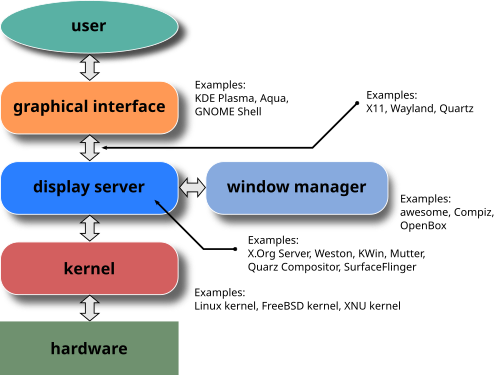
Image source: https://en.wikipedia.org/wiki/X.Org_Server
This system has an X server which manages the rendering of windows, configures window displays, and handles inputs from things like keyboards and mice.
X clients in this context can be things like your terminal, Alacritty for example, or Firefox, or any other GUI you might be familiar with. These clients connect to the X server and ask for their graphics to be rendered.

Image Source: https://itsfoss.com/display-server/
To see what X clients you have running currently you can use
$ xwininfoAfter running this you can click one of your running windows and get some information regarding it.
I mentioned the X server interfacing with input and output devices and sending information to the appropriate clients from these devices. The communication here is an event in the context of the X window system.
To experiment with events you can run
$ xevThis will open a new window in which you can do things like drag the mouse across it or type from your keyboard into it and see what event in X corresponds to the action you took.
You can also run this experiment on windows you already have opened using the “id” flag
$ xev -id 0x10003AThe id you pass can be found using the previously mentioned xwininfo command.
This process may look something like:
$ xwininfo
    .
    .
    .
    xwininfo: Window id: 0x10000AB "Alacritty"
$ xev -id 0x10000AB